Chapters
- Introduction
- Default Vote Behavior
- What Are Dynamic Voting Rights?
- When Do You Need This Feature?
- How to Enable Dynamic Voting Rights
- How Changes Are Applied
- Email Notifications
- Important Limitations and Warnings
- Real-World Use Cases
- Best Practices
- Frequently Asked Questions
- Next Steps
Introduction
In most voting scenarios, your voter list is finalized before voting begins. However, sometimes eligibility changes during an ongoing vote—late registrations, proxy authorizations, or multi-day voting periods where final participant lists aren't confirmed until partway through.
NemoVote's Dynamic Voting Rights feature lets you adjust voting eligibility in real-time, even after a vote has opened. This guide explains how it works, when to use it, and what safeguards protect your election integrity.
Default Vote Behavior
By default in NemoVote, voting rights are locked once a vote opens. Here's what happens:
- Vote opens → NemoVote takes a snapshot of all eligible voters
- This snapshot is stored immutably in the database
- No new voters can be added; eligible voters cannot be removed
- Results are calculated based only on this fixed voter list
Why this design?
- Ensures election integrity and prevents manipulation
- Voters know exactly who is eligible at voting start
- Clean audit trail with no last-minute changes
This is the safest default for most elections.
What Are Dynamic Voting Rights?
Dynamic Voting Rights is an optional feature that relaxes this restriction. When enabled, you can:
✅ Add new voters to eligible lists → they immediately gain voting rights
✅ Remove voters (before they vote) → they immediately lose access
✅ Update voter properties in real-time (e.g., voting weight changes)
✅ See changes reflected instantly in admin overviews, roll calls, and results tables
Important: Already-cast votes remain immutable and protected at all times.
When Do You Need This Feature?
Consider enabling Dynamic Voting Rights for:
1. Multi-day voting periods with evolving eligibility
- Votes that stay open for 3+ days where final participant lists aren't confirmed at start
- Example: Online shareholders arrive throughout the voting period
2. Proxy voting with late authorizations
- Proxy votes are approved mid-election
- New proxy holders need immediate voting access
- Example: Setup Proxy Voting
3. Participant registration windows
- Late registrations close on day 2 of a 5-day vote
- New registrants should be able to vote immediately
4. Evolving team compositions
- Team member changes mid-election (new hires, departures)
- Organizational restructures during voting
Do NOT use this for:
- Live, time-critical votes (< 2 hours)
- High-security elections where you want a frozen voter list
- Situations where you need full control over "voting start" moment
How to Enable Dynamic Voting Rights
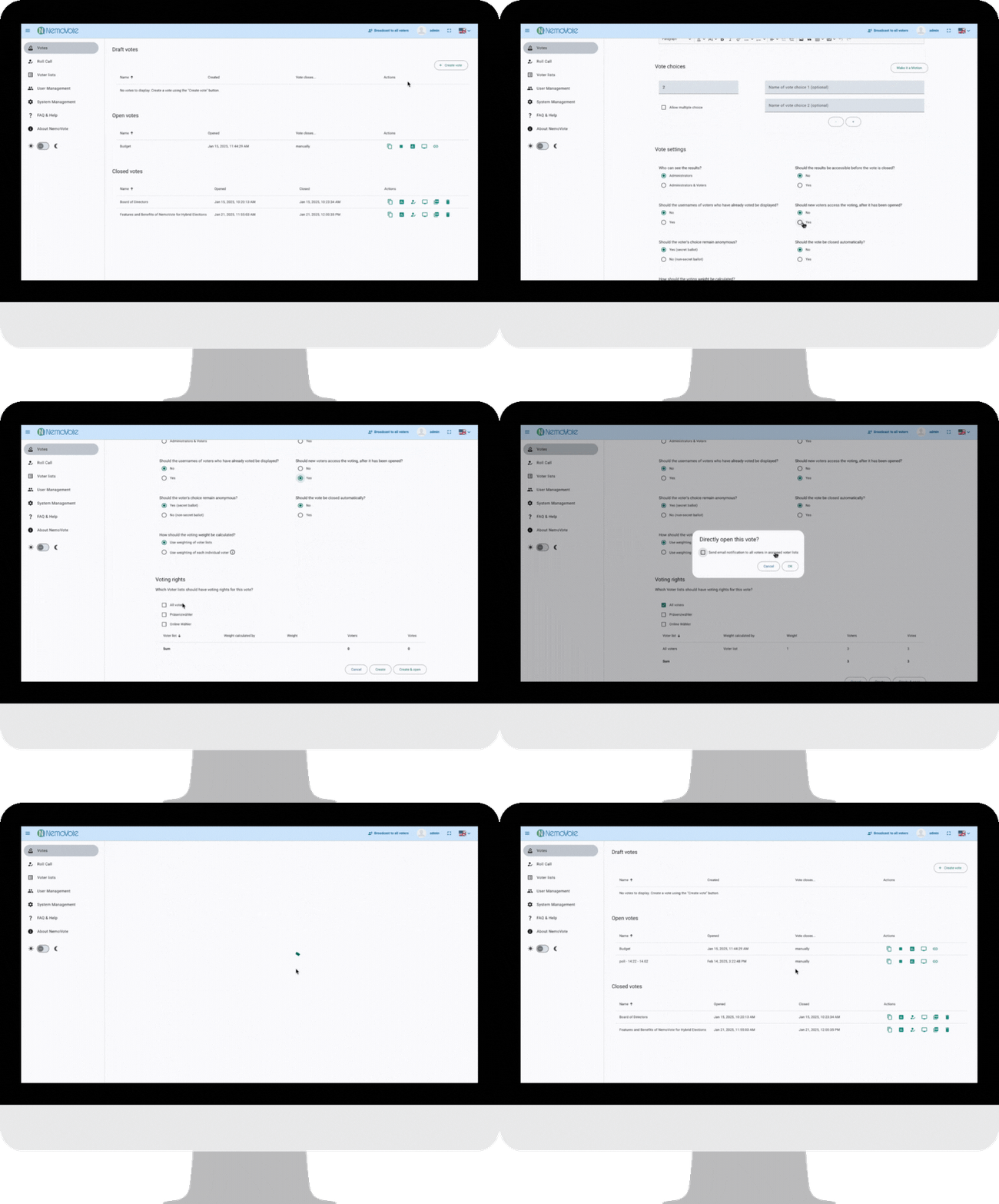
When creating a new vote in NemoVote's vote settings, look for this option:
"Should new voters access the voting, after it has been opened?"
- Set to No (default) → Voting rights are locked at vote start
- Set to Yes → Voting rights stay dynamic throughout the voting period
You can also enable this before opening a vote if you've created it in Draft status.
Timing matters: Once you open the vote, you can no longer change this setting. Enable it before opening, not after.
How Changes Are Applied
Adding Voters
When you add a voter to an eligible list (e.g., via voter list updates):
- NemoVote immediately grants them voting rights
- If email notifications are enabled, they receive an invite email
- They appear in admin overviews and roll call lists
- Results tables update to include them in eligible voter counts
Key point: They can vote immediately—there's no delay or waiting period.
Removing Voters
When you remove a voter from an eligible list:
- If they haven't voted yet: Voting access is revoked immediately
- If they have already voted: Their vote remains counted (immutable protection)
- Admin overviews update instantly
- They do not receive a notification
Critical: Be careful when deleting entire voter lists—this removes rights for all unvoted voters.
Paper Ballot Analogy
Think of Dynamic Voting Rights like managing physical ballots:
- Adding a voter = Handing out an additional ballot after voting has begun
- Removing an unvoted voter = Taking back their blank ballot before they submit it
- Already-submitted ballots = Sealed in the ballot box; cannot be retrieved or changed
Email Notifications
Fixed Voting Rights (Default, "No")
When voting rights are locked:
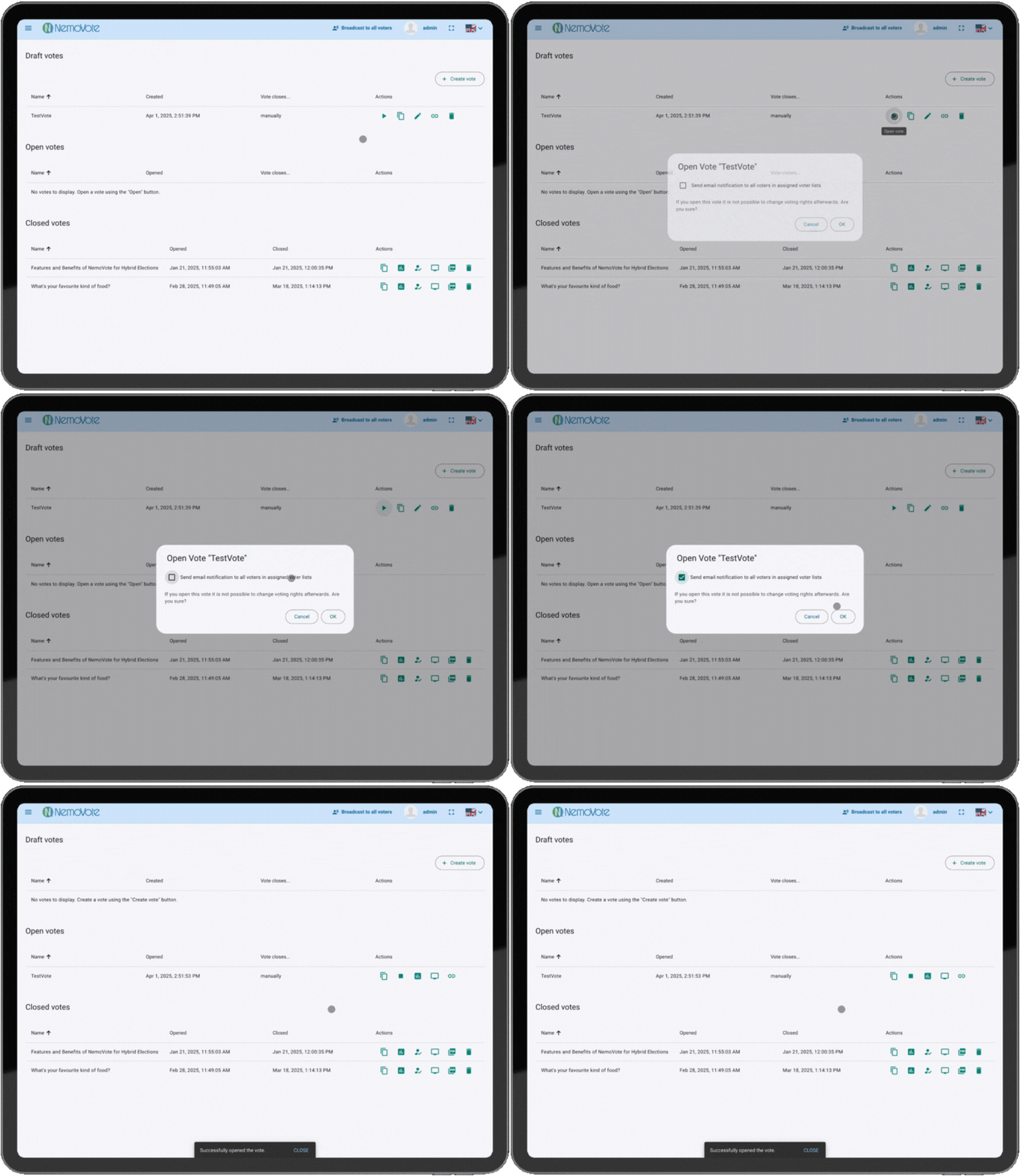
- Opening the vote triggers a warning for admins: "Voting rights are now locked"
- Admins can optionally send an email to all eligible voters announcing the vote
- No further emails sent if the voter list changes (because it won't)
Dynamic Voting Rights (Enabled, "Yes")
When voting rights are dynamic:
Initial voters (at vote start):
- Receive a standard notification email about the open vote (if notifications are enabled)
Newly added voters:
- Automatically receive an email notification with voting access and link
- No manual action needed from you
Removed voters:
- Do not receive a notification
- Their access simply disappears
Important Limitations and Warnings
⚠️ Critical Limitations
1. Cannot change voting rights after vote closing Once a vote is closed, no further changes to voter lists affect that election.
2. Cannot undo already-cast votes If a voter has submitted a ballot and you later remove them from the voter list, their vote remains counted. Votes are immutable.
3. Deleting entire voter lists removes all unvoted rights If you delete a voter list entirely, every voter on that list who hasn't voted yet loses access instantly.
4. No partial rollback Changes are applied immediately and globally—there's no "undo" option for individual changes.
✅ Protections in Place
- Already-cast votes cannot be altered or removed
- All changes are logged with timestamps in audit trails
- Admin overviews clearly show current eligible voters
- Vote integrity is maintained despite dynamic changes
Best practice: Before making large changes (bulk additions/removals), always take a screenshot of your admin overview as backup reference.
Real-World Use Cases
Scenario 1: Extended Multi-Day Vote
You run a 7-day shareholder vote. On day 1, you have 150 eligible voters. On day 3, 12 new shareholders complete their registration. With dynamic voting rights:
✅ Add the 12 new shareholders → They get instant voting access
✅ They can vote immediately without restarting the election
✅ Results automatically include their votes in final counts
Scenario 2: Proxy Voting Adjustments
Mid-vote, new proxy delegations arrive. If "Apply new delegations to already-opened votes" is enabled in your Proxy Settings, a new or updated delegation takes effect immediately on an open vote, no need to touch voter lists or delete anyone. The delegating voter's voting right transfers to their proxy as soon as the delegation is created.
Scenario 3: Team Reorganization
Your organization undergoes a department restructure during a vote. Some team members move departments, affecting voting group membership. With dynamic voting rights:
✅ Update voter list assignments in real-time
✅ New group members gain access; departed members lose access
✅ No need to pause or restart the vote
Best Practices
Plan Before Enabling
Decide early if you need dynamic rights:
- Will voter eligibility change? → Use dynamic rights
- Is the voter list final? → Keep default (locked) rights
- Changing your mind mid-vote? → Too late; you can't toggle this after opening
Communicate Deadlines Clearly
If using dynamic rights, inform voters of:
- Registration/eligibility deadline: "New voters can register until Day 4 at 5 PM"
- Voting period: "Voting closes on Day 7 at 6 PM"
- What changes mean: "Newly eligible voters will receive an email automatically"
Document Changes
Keep a log of voter list modifications:
- Who was added/removed?
- When?
- Why?
This is valuable for audit trails and compliance documentation.
Test Before Going Live
With a test vote:
- Enable dynamic rights
- Add/remove a test voter
- Verify they gain/lose access
- Check email notifications work
- Confirm admin overviews update correctly
Minimize Large Bulk Changes
If possible:
- Make small, incremental changes rather than bulk deletions
- Give yourself time to verify each change's impact
- Avoid bulk removals close to voting deadline
Frequently Asked Questions
Next Steps
You're ready to use dynamic voting rights. Explore these related topics:
- Managing Voter Lists: Voter List Management
- Creating Votes: Step-by-Step Election Management with NemoVote
- Proxy Voting Setup: Proxy Voting with NemoVote
- Email Notifications: Customizing Voter Invitation Emails