Chapters
- Introduction
- What Are Ballot Comments?
- Step-by-Step: Enabling Ballot Comments
- Best Practices for Ballot Comments
- Anonymity and Data Protection
- Frequently Asked Questions
- Next Steps
Introduction
Ballot Comments (Comment on Ballot) enable voters to justify or qualify their personal voting decision. Unlike vote comments, which occur at the vote level, ballot comments are tied to an individual voter's specific ballot.
This guide shows you how: enable the feature, manage voter comments, export them, and protect voter privacy.
What Are Ballot Comments?
Comment on Ballot vs. Comment on Votes
It's important to distinguish between two different commenting features in NemoVote:
Comment on Ballot (Ballot-Level Comments)
- Scope: A single ballot cast by an individual voter, linked to their specific choices
- Who can add: The eligible voter during the voting process
- Purpose: Personal justification, feedback on their choice, qualified voting statement
- Example: A voter writes next to their "No" vote: "This decision conflicts with our Code of Conduct"
Comment on Votes (Vote-Level Comments)
- Scope: The entire vote or positions within the election, aggregated without personal references
- Who can add: Primarily admins and board leaders (based on permissions)
- Purpose: Documentation, result explanation, contextual information about the voting process as a whole
- Example: "Motion passed with 87% approval. Next steps: Implementation by June 30, 2026"
→ Learn more: Managing Vote Comments
In short: Comment on Ballot = voters justify their personal decision. Comment on Votes = documenting and recording the election as a whole.
Use Cases for Ballot Comments
Ballot comments are ideal for these scenarios:
1. Qualified Voting and Minority Protection
- Voters can justify their vote: "I vote yes, but with concerns about point 3"
- Diverse perspectives become visible, even with clear overall results
2. Deliberative Democracy
- Organizations encourage thoughtful decisions by letting voters document their reasoning
- Ballot comments show the deliberation process
3. Transparency Requirements
- Compliance needs that require traceability of individual positions
- Board chairs can understand what concerns exist about a decision
4. Feedback and Input
- Voter feedback on processes or content
- "I vote yes, but would have appreciated more time for discussion"
5. Multilingual and Inclusive Voting
- Voters can comment and justify in their own language
- Supports accessible participation
Step-by-Step: Enabling Ballot Comments
Activate Comments When Creating a Vote
When setting up a new online voting process:
- Open the NemoVote admin dashboard and click Create Vote
- Fill in basic info (title, description)
- Go to Vote Settings
- Find "Allow Voters to Comment on Their Ballot"
- Toggle it Yes
- Save the vote configuration
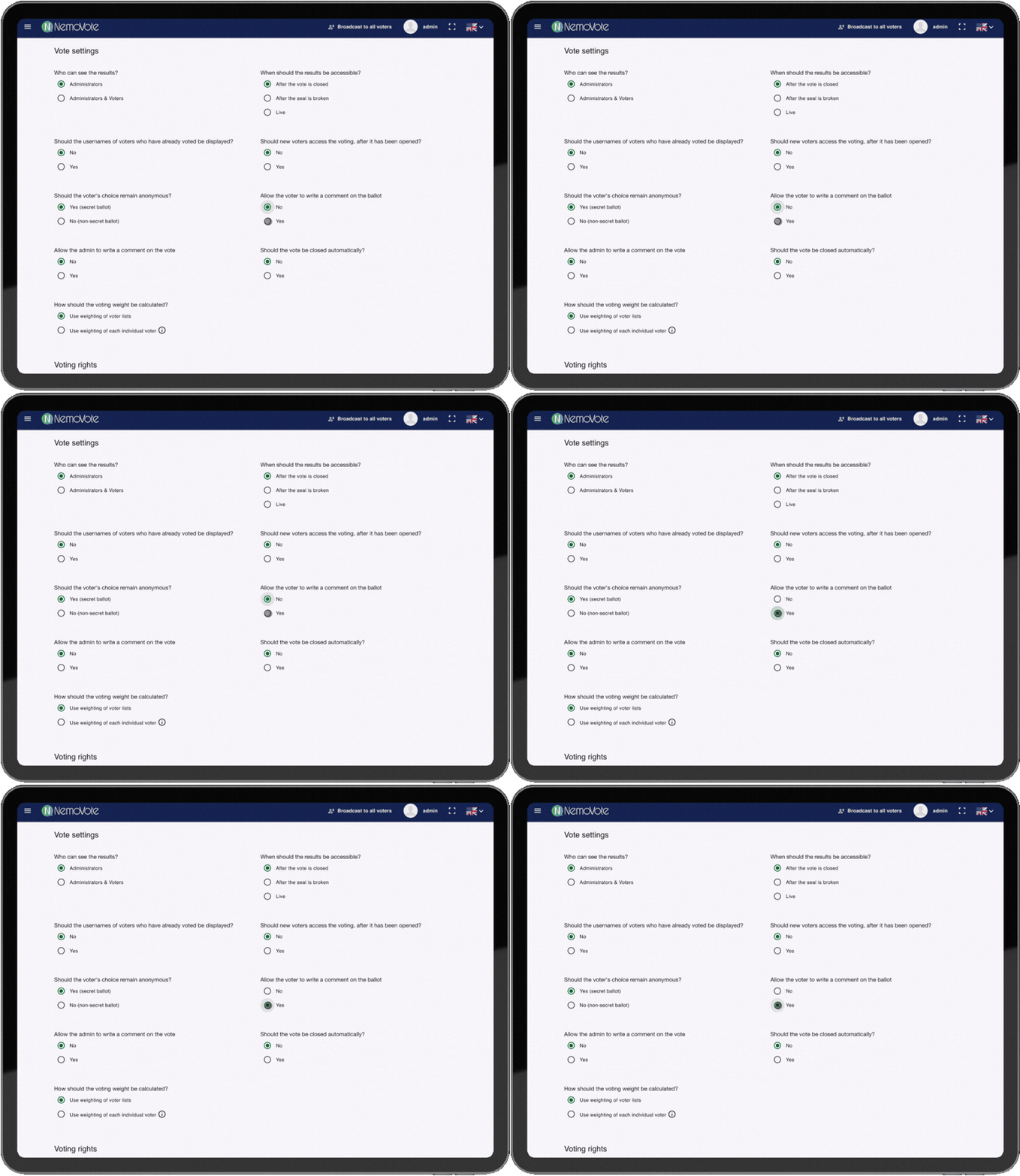
Workflow: Enabling ballot comments in Vote Settings
You can also enable ballot comments later if the vote is still in Draft status. Once it's open or closed, you can't change this.
For existing votes (Draft status):
- Open the Draft vote
- Click Edit
- Go to Vote Settings
- Enable Ballot Comments and save
Voters Add Comments
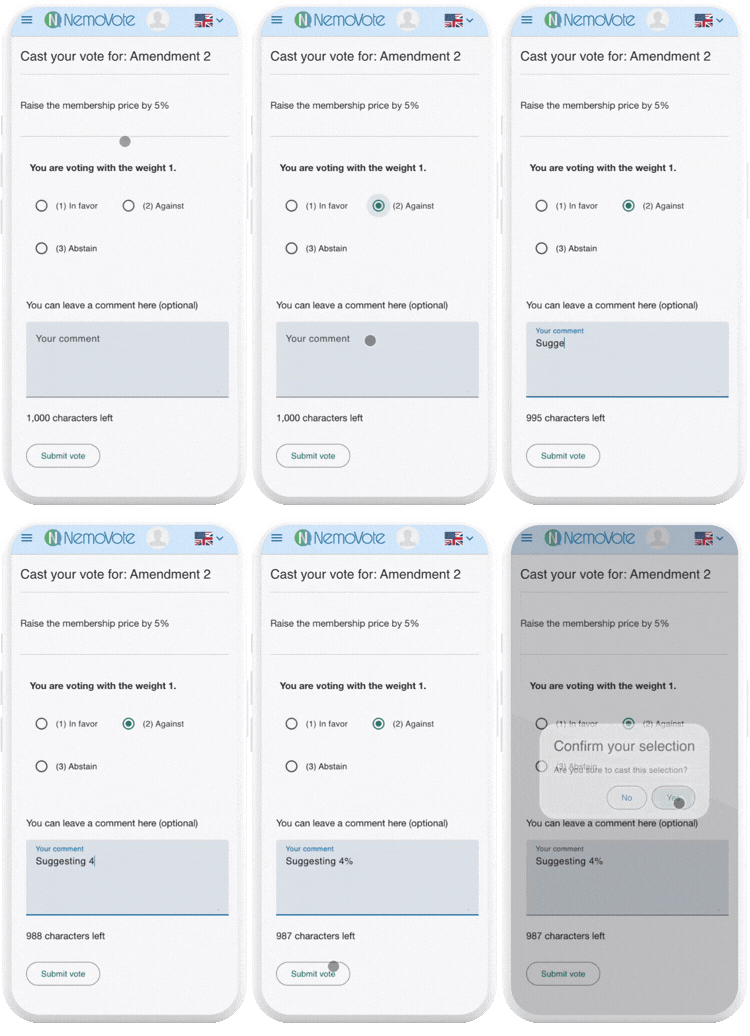
Once ballot comments are enabled, voters can add a comment to their personal voting choice during the voting process.
How it works for voters:
- Voters open the vote
- They make their choice (e.g., "Yes," "No," "Abstain")
- A text field appears: "Add a comment to your choice (optional)"
- Voters can write a personal comment
- They save their choice together with the comment
Voters add a comment during the voting process
Ballot Comments in the Results View
After the vote closes, ballot comments are visible in the admin dashboard under the results.
What is displayed:
- The comment itself
- The associated voting choice (Yes/No/Abstain)
- For non-anonymous votes: The voter's display name
- For anonymous votes: No link between comment and voter
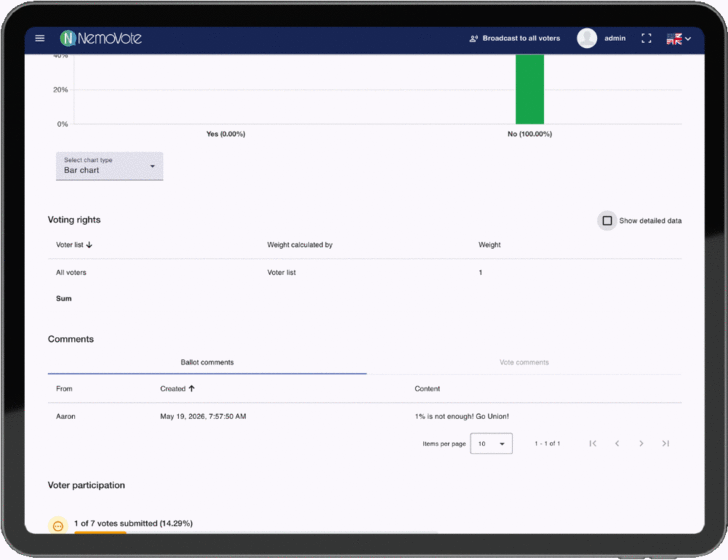
Ballot comments in the results view
Privacy Note: In anonymous votes, voter names are not shown to protect privacy. In non-anonymous votes, a link between comment and voter is visible.
Best Practices for Ballot Comments
Encourage voters to comment
When ballot comments are enabled, actively invite voter participation:
- In the vote description: "Your comment is optional – feel free to share your thoughts"
- In the announcement: Explain why comments are valuable
Manage expectations moderately
Not all voters will comment. That's normal. Expect participation rates of 10–30%, depending on engagement and topic.
Review comments before publishing
If you plan to export or publish ballot comments, review them first for:
- Appropriateness and respectfulness
- Compliance with your communication guidelines
- Data protection conformity
Protect anonymity in anonymous votes
If you've promised anonymity, ensure comments cannot indirectly identify voters (e.g., through very personal or distinctive writing style).
Anonymity and Data Protection
Anonymous vs. Non-Anonymous Votes
In non-anonymous votes:
- The voter's display name appears next to the comment
- There is a clear link between comment and voter
- Ideal for official bodies where transparency is expected
In anonymous votes:
- Comments are not linked to a voter
- No voter ID or name is displayed
- Voter anonymity is preserved, even when commenting
Storage and Compliance
- Ballot comments are stored in NemoVote's encrypted database
- Access control: Only admins with appropriate permissions can view comments
- Audit trail: Every comment is logged with a timestamp
- When a vote is deleted, all associated comments are also deleted
Frequently Asked Questions
Next Steps
You're ready to use ballot comments now. More resources:
- Vote-level comments: Managing Vote Comments
- Vote management: Step-by-Step Election Management with NemoVote
- Export results: Export Results as PDF