Chapters
- Introduction
- What Is Sealed Voting?
- Step-by-Step: Setting Up Sealed Voting
- Audit Trail and Transparency
- Best Practices for Sealed Voting
- Frequently Asked Questions
- Next Steps
Introduction
Sealed Voting is a security and transparency feature that keeps voting results hidden until deliberately unsealed by an admin. This prevents accidental result leaks, enables coordinated announcements, and creates a reliable audit trail.
This guide shows you how to set up sealed voting, break the seal, and use the audit log.
What Is Sealed Voting?
When Do You Need Sealed Voting?
Sealed Voting is ideal for these scenarios:
1. Coordinated Communication
- You want to announce results only after an official statement
- All stakeholders should be informed simultaneously
2. Compliance and Audit Requirements
- When a notary or all observers need to be present to open the results
- Regulations that require traceability of who disclosed results and when
- Transparent access to voting results through documented admin actions
How Does Sealed Voting Work in NemoVote?
Whether or not results are being visible for administrators or administrators and voters depends on the settings of the vote.
Live voting:
- Vote runs → Results are visible in real time as ballots come.
After the vote is closed
- Vote runs → Results are hidden
- Vote cloeses -> Results are visible
Sealed voting:
- Vote runs → Results are hidden
- Vote closes → Seal remains active
- Admin breaks seal → Results are displayed
- Audit trail records: Who, when, with which username broke the seal
Step-by-Step: Setting Up Sealed Voting
Activate Sealed Voting When Creating a Vote
When setting up a new online voting process:
- Open the NemoVote admin dashboard and click Create Vote
- Fill in basic info (title, description)
- Go to Vote Settings
- Find "When should the results be accessible?"
- Toggle it After the seal is broken
- Save the vote draft
Sealed voting can only be enabled during creation. You cannot add it later to an open or closed vote.
What happens during the vote:
- Voters can vote normally
- Admins cannot see the results until the seal is broken
- If the vote closes, the seal remains active
Breaking the Seal and Displaying Results
Once the vote closes, you can break the seal and release the results.
How it works:
- Open the closed vote in the admin dashboard
- Navigate to Results
- You see a message: "This vote is sealed. Results are not visible."
- Click the button "Break Seal"
- Confirm the action
- Results are now displayed
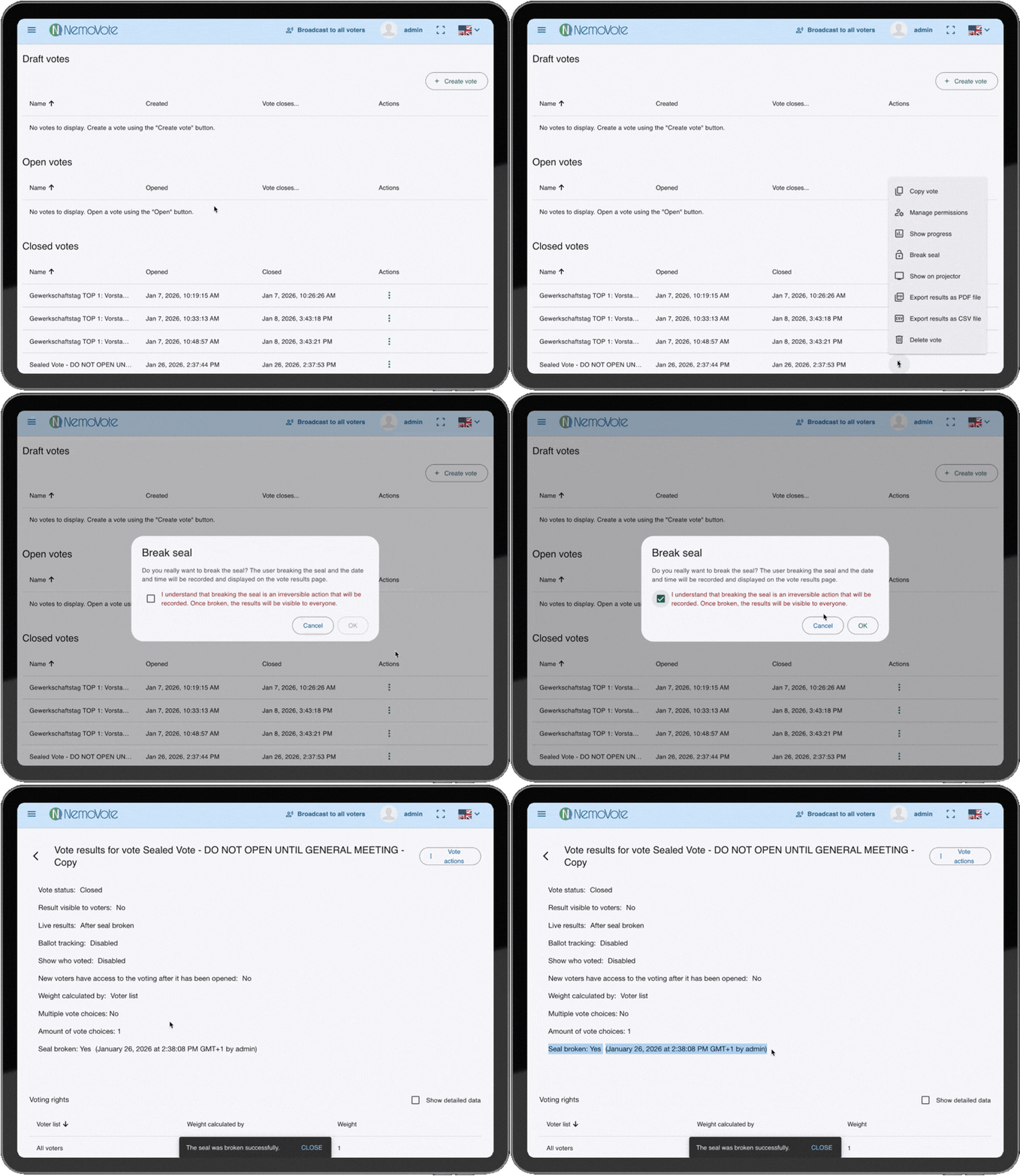
Breaking the Seal: Releasing Results
After breaking the seal:
- All results are visible (percentages, vote counts, charts)
- Ballot comments are displayed (if enabled)
- Vote comments are displayed (if added)
- PDF export can be performed
Audit Trail and Transparency
Who Broke the Seal?
NemoVote logs every time an admin breaks a seal:
What is recorded:
- Username of the admin who broke the seal
- Timestamp (date and time)
- Action: "Seal broken"
Where to view it:
- In the admin dashboard under Voting Results → Settings
The voting results settings transparently show that the seal was broken, along with the exact timestamp and username of who broke it.
Why This Matters
The audit trail creates accountability and trust:
- It's documented who accessed the results
- Timestamps prove when the release happened
- Manipulation is impossible: The seal can only be actively broken.
Best Practices for Sealed Voting
Plan Before Creating the Vote
Decide before vote creation:
- Do you really need sealed voting, or is regular access sufficient?
- Who may break the seal? (Usually only admins, potentially organizers)
- When should the seal be broken? (Immediately after vote closes or later?)
Document for Later
After breaking the seal:
- The audit trail is automatically saved in the vote results export
Frequently Asked Questions
Next Steps
You're ready to use sealed voting. More resources:
- Export voting results: Export Results as PDF
- Vote management: Step-by-Step Election Management with NemoVote
- Security and compliance: Security and Compliance in NemoVote