Chapters
- What is Proxy Voting
- Delegating Your Vote
- Seeing Delegations You've Received
- Casting a Vote as a Proxy Holder
- Revoking a Delegation
- Important Notes
- Additional Resources
What is Proxy Voting
If you can't participate in a vote yourself, you can delegate your voting right to another eligible voter. That person then casts a ballot on your behalf, in addition to their own. If your organization uses weighted voting, your voting weight transfers along with the delegation.
Not every organization allows voters to delegate their own vote. In some cases, only an election manager can set up a delegation on your behalf. If you don't see a Proxy Voting page in your account, ask your election manager whether self-service delegation is enabled.
Delegating Your Vote
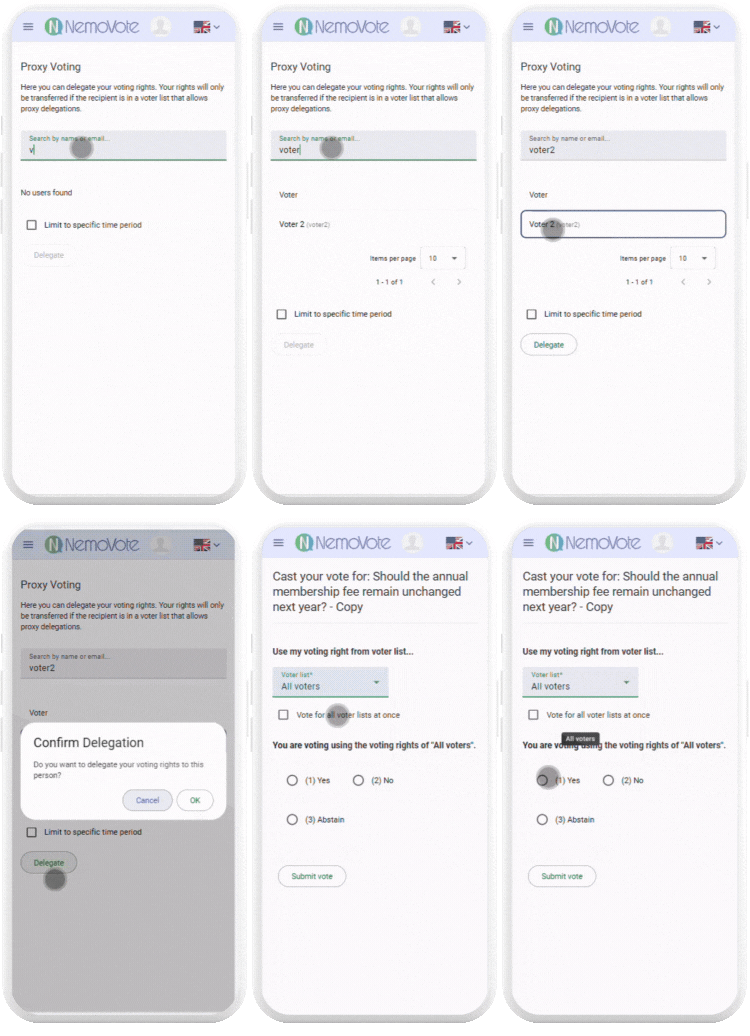
- Set up your delegation in your NemoVote menu under Proxy Voting on the left side.
- Search for the person you want to delegate to. Use your organization name, first and last name, member number, or email address. If you can't find the person you want, ask your election manager which reference numbers, usernames, or display names are registered.
- Optionally, you can limit the delegation to a specific time period. We recommend this—restrict it only to your organization's voting dates.
- Click Delegate.
- Your delegation is now set up.
Your voting right will only transfer if the person is eligible to receive delegations. If they're not on an eligible voter list, the delegation won't take effect.
"My active delegations" shows you your sent delegation in the system at any time. You can only send one delegation.
Seeing Delegations You've Received
If someone has delegated their vote to you, you'll see it listed under Received delegations on the same page, including who delegated to you, when they did, and the period the delegation is valid for.
Casting a Vote as a Proxy Holder
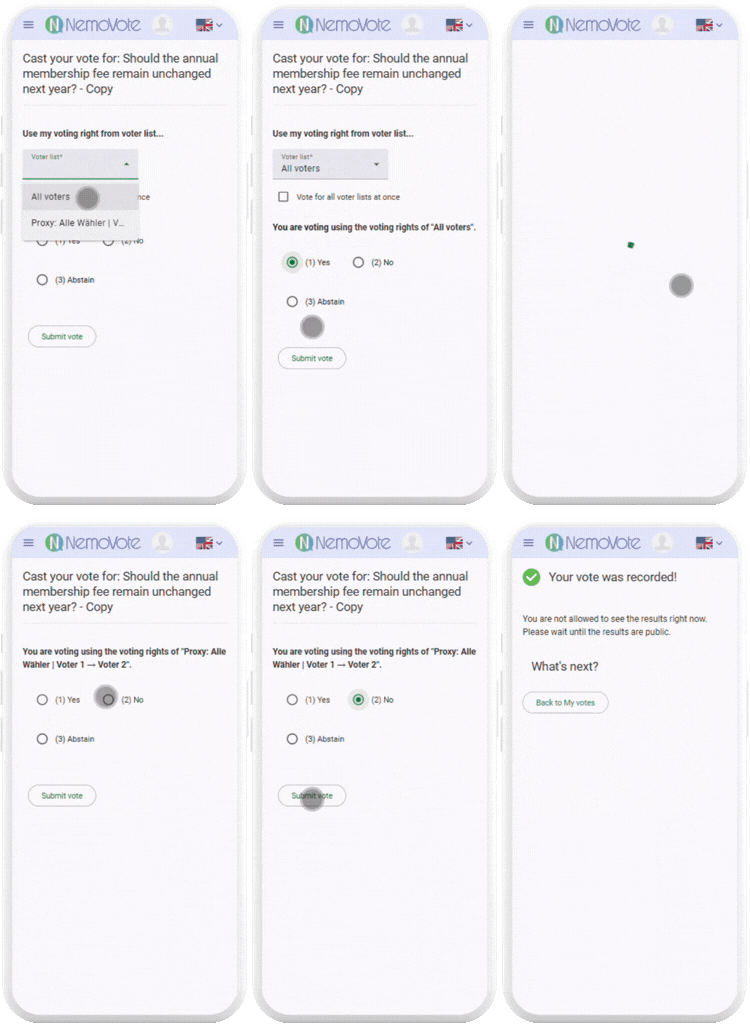
When you open a vote, you'll see your own voting right plus any voting rights that have been delegated to you.
- Select your own voting right to cast your own ballot.
- Switch to a delegated voting right to cast that ballot separately. You can vote differently on each one.
- Or check "Vote for all voter lists at once" to submit your ballot and all delegated ballots in a single action.
Each ballot is recorded and documented separately, even if you submit them together.
Learn more about how you vote.
Revoking a Delegation
You can delete a delegation you created at any time from the same Proxy Voting page. If you revoke it before the person you delegated to has voted, your voting right transfers back to you automatically. After the ballot has been cast, it can no longer be reversed.
Only you can delete a delegation you created yourself. An election manager cannot remove it on your behalf.
Important Notes
- Cascading delegations: If the person you delegated to has also delegated their vote further, the last person in the chain receives all accumulated ballots.
- Eligibility matters: Your delegation will only transfer if the recipient is on a voter list eligible to receive delegations. If the recipient isn't on the list, you'll still need to cast your vote yourself.
- Not every organization allows self-service: If you don't see a Proxy Voting page, your election manager may be handling delegations directly. Contact them if you can't cast your vote yourself.