Chapters
- 🚨 Instant Help: Act Now!
- Introduction and Overview
- Most Common Causes
- Solution 1: Resend Email
- Solution 2: Correct Email Address
- Solution 3: QR Code for Immediate Access
- Solution 4: Manual Password
- Additional Resources
🚨 Instant Help: Act Now!
Problem: Your voters are not receiving the Magic Link email?
Quick checklist (30 seconds):
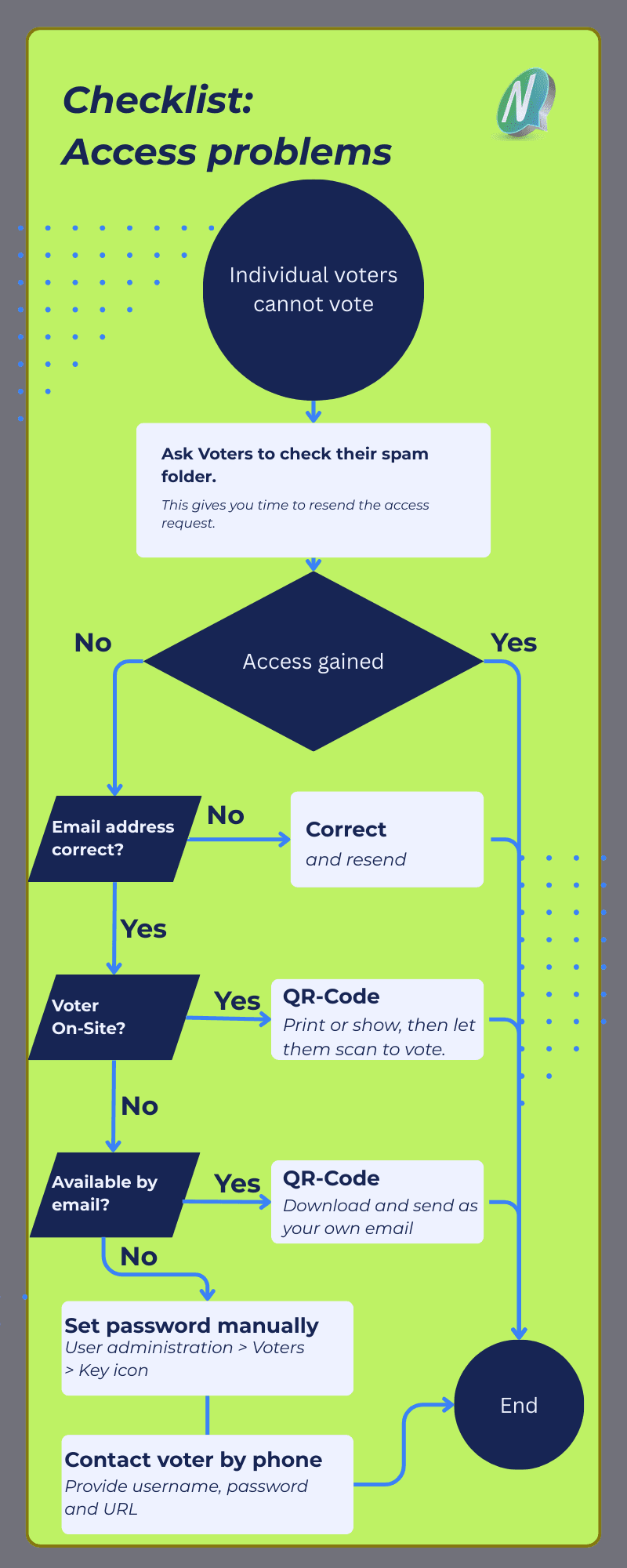
- Resend email → User Management > Voters > Envelope icon
- Ask them to check spam → “Please check your spam folder!”
- Show QR code → User Management > Voters > QR code icon (on site or via mail!)
- Manually set password and send via email → User Management > Voters > Key icon
Your event URL: 'YOUREVENTNAME.nemovote.com' (top of your admin URL)
Done! Now every voter has access.
Introduction and Overview
NemoVote sends access credentials by default as a Magic Link via email. Occasionally, this email may not arrive. Don’t panic: Here are trusted solutions!
This article provides fast and compliant help when your voters lack access.
Most Common Causes for Authentication Issues
Why is the Magic Link email not arriving?
- Wrong or outdated email address
- Email marked as spam or blocked
- No email access / mailbox full
Solution 1: Resend Email
First and always:
- Go to User Management > Voters
- Click the Envelope icon next to the voter
- Resend access email
Solution 2: Correct Email Address
Wrong email? Fix it now:
- Select the voter in User Management > Voters
- Click the Pencil icon (edit)
- Enter the correct email address
- Save
- Click the mail icon to send out credentials again
Solution 3: QR Code for Immediate Access
Voter is on site? Perfect!
- Select voter in User Management
- Click the QR code icon
- Show or print the QR code = direct Magic Link access!
Remote? Download QR code and send it from your business email (firewalls rarely block these emails).
Solution 4: Manual Password
Last resort: Phone or postal: Voter has no email access or no email address? Here’s how:
- Go to User Management > Voters > Key icon
- Manually change password
- Provide username and password to voter
- Share event URL:
YOUREVENTNAME.nemovote.com
Important: Refer them to this login article (video explains login!)
After voting: Voter should change password themselves so you have no further access.
Additional Resources
Everything for smooth voting:
- Comprehensive User Management
- Magic Links & Authentication
- Manage Voter Lists
- How Voters Cast Ballots
- Live Support: team@nemovote.com