Chapters
- The Problem
- The Solution: Comments Instead of Paper
- Practical Scenario
- Best Practices for Recording Protocols
- Next Steps
The Problem
The PDF export automatically generates a report with results and basic metadata. That's sufficient for many organizations. But not always. Sometimes you need additional information: discussion points, justification for the result, responsibilities for next steps, or notes on quorum and legal validity.
Until now, you've solved this manually: print the report, write notes by hand, scan it, file it away. Time-consuming. Error-prone. Not searchable.
The Solution: Comments Instead of Paper
Instead of paper and a scanner, use vote comments. The admin or board leader writes a structured note directly into the system right after the vote closes. It becomes part of the voting record, appears in the PDF export, and stays permanently accessible.
It's not just faster. The information is:
- Digital: No paper, no scanning
- Structured: Consistent format across all votes
- Complete: Notes are linked to results, not stored separately
- Searchable: Later, you can search your archive by comment
Practical Scenario
Your board holds a member assembly. Agenda item 5 is a vote on bylaw amendments.
The old way:
- Vote runs online
- Result: 73% approval
- Export as PDF
- Print it
- Write by hand: "Bylaw amendment valid. Implementation by Board Chair by June 30, 2026."
- Scan it
- Paper goes to filing cabinet, digital version ends up somewhere in a folder
With vote comments:
- Vote runs online
- Result: 73% approval
- Open the vote, click "Add Comment," and write:
[DECISION] Bylaw amendment passed (73% approval)
[NEXT STEPS] Implementation by Board Chair, report at next assembly
[DEADLINE] June 30, 2026
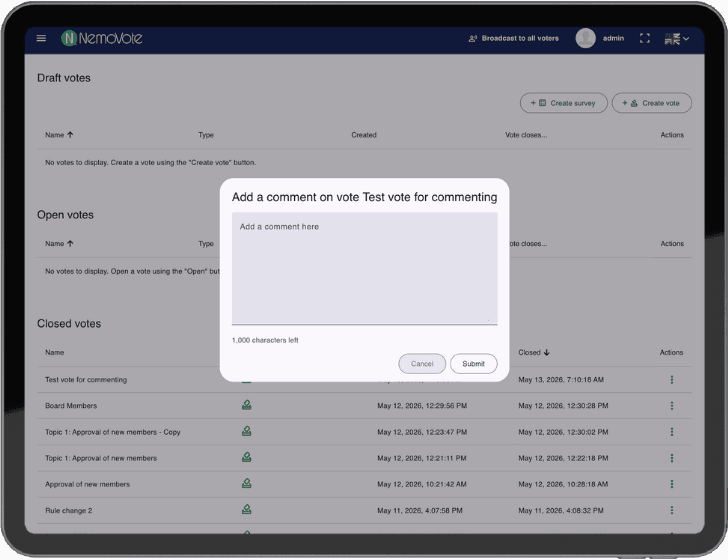
Add your comment directly in the system
- Export the PDF – comment is already included
- Done. Everything in one place, digital, permanent.
Best Practices for Recording Protocols
Write in a structured format: Use a consistent template. Easier to write, easier to read later.
[AGENDA] Item 5 – Bylaw Amendment
[METADATA] Quorum met (89 of 120), secret ballot conducted
[RESULT] 73% approval, valid
[DISCUSSION] Two opposing votes with justification in written remarks from May 15, 2026
[DECISION] Bylaw amendment passed and valid
[NEXT STEPS] Registry entry by Board Chair, member notification
[DEADLINE] June 30, 2026
[RESPONSIBLE] Treasurer (name)
Who writes:
- Admin: Technical and procedural notes (quorum, ballot type, results)
- Board leader: Discussion points, justifications, next steps
Both can add comments – they appear together in the export.
When to write: Immediately after the vote closes, while details are fresh. Not later "at some point."
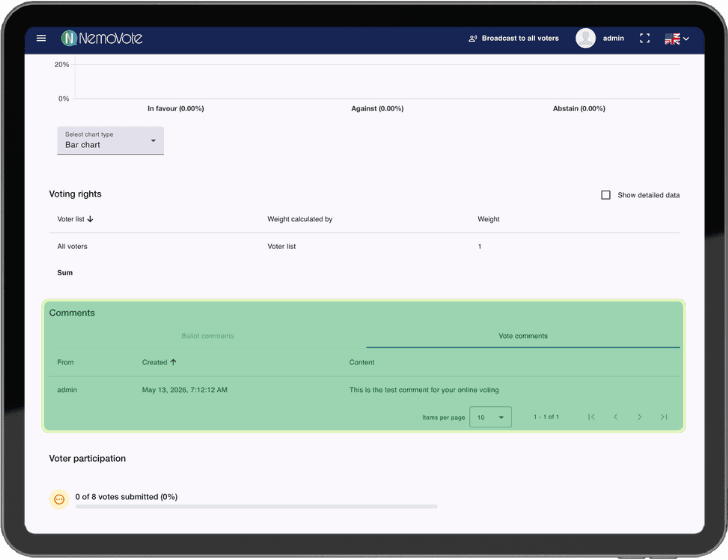
Your comments are part of the voting results
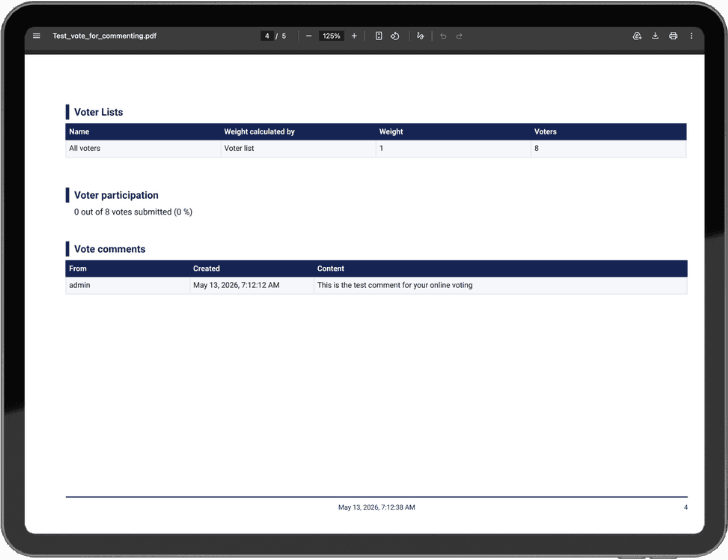
Vote comments in PDF export – automatically integrated into your protocol
Next Steps
To record voting protocols:
- Enable the feature: Setting Up and Managing Vote Comments
- Add comments: Write a structured note after each vote
- Export: The PDF includes comments automatically – ready for filing